Client Billing Tab
The Client Billing tab in ISPBox is the per-customer billing workspace for reviewing balances, creating invoices, recording payments, managing pending charges, issuing credit notes, and tracking billing activity.
Overview
The Billing tab in Client View is your per-customer billing workspace.
It is used to review balances, preview the next invoice, add one-time charges, create invoices, record payments, issue credit notes, and track billing audit activity.
Navigation
| Item | Value |
|---|---|
| Menu path | Clients → View Client → Billing |
| URL pattern | /clients/view/client_id={id}?tab=billing-tab |
| Scope | Only the currently opened client |
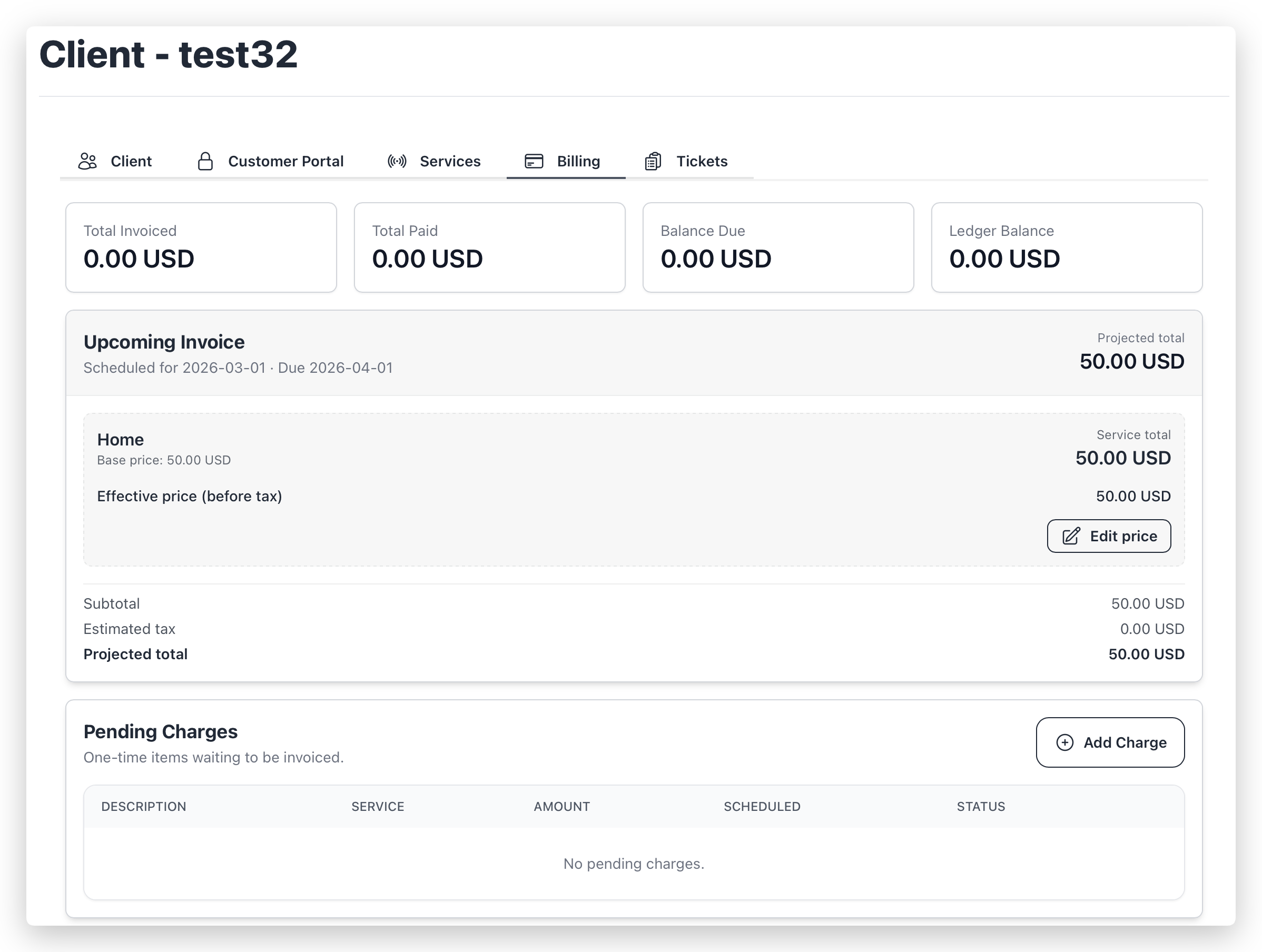
1) Billing Summary Cards
The top row provides a quick financial snapshot.
| Card | Meaning |
|---|---|
| Total Invoiced | Sum of client invoices (void invoices excluded). |
| Total Paid | Sum of completed payments (excluding Sonar discount source). |
| Balance Due | Total Invoiced - Total Paid. |
| Ledger Balance | Sum of ledger entries for the client; if no ledger exists yet, fallback is Balance Due. |
2) Upcoming Invoice
This section appears only when the system finds upcoming billable content.
| Area | What you see |
|---|---|
| Header | Projected issue date, due date, projected total |
| Service blocks | Base price, effective price, estimated tax, service total |
| One-time items | Pending non-service charges that will be included |
| Summary | Subtotal, estimated tax, projected total |
Edit Price (per service)
Use Edit price to set a final service amount for the next invoice.
| Behavior | Result |
|---|---|
| Final amount > base amount | Positive adjustment is added to next invoice |
| Final amount < base amount | Discount adjustment is added to next invoice |
| Final amount = base amount | Existing adjustment is removed |
Technical note: adjustments are stored as pending items (service_price_override) and merged during invoice generation.
3) Pending Charges
One-time items waiting to be invoiced.
| Action | Description |
|---|---|
| Add Charge | Creates a pending invoice item (optionally linked to a service) |
| Cancel | Available for pending items; changes status to cancelled |
Add Charge fields
| Field | Description |
|---|---|
| Description | Required charge label |
| Amount | Required, minimum 0.01 |
| Service | Optional service link |
| Currency | Tenant/client billing currency |
| Schedule Date | Optional date; controls when item is eligible |
| Internal Notes | Optional internal metadata |
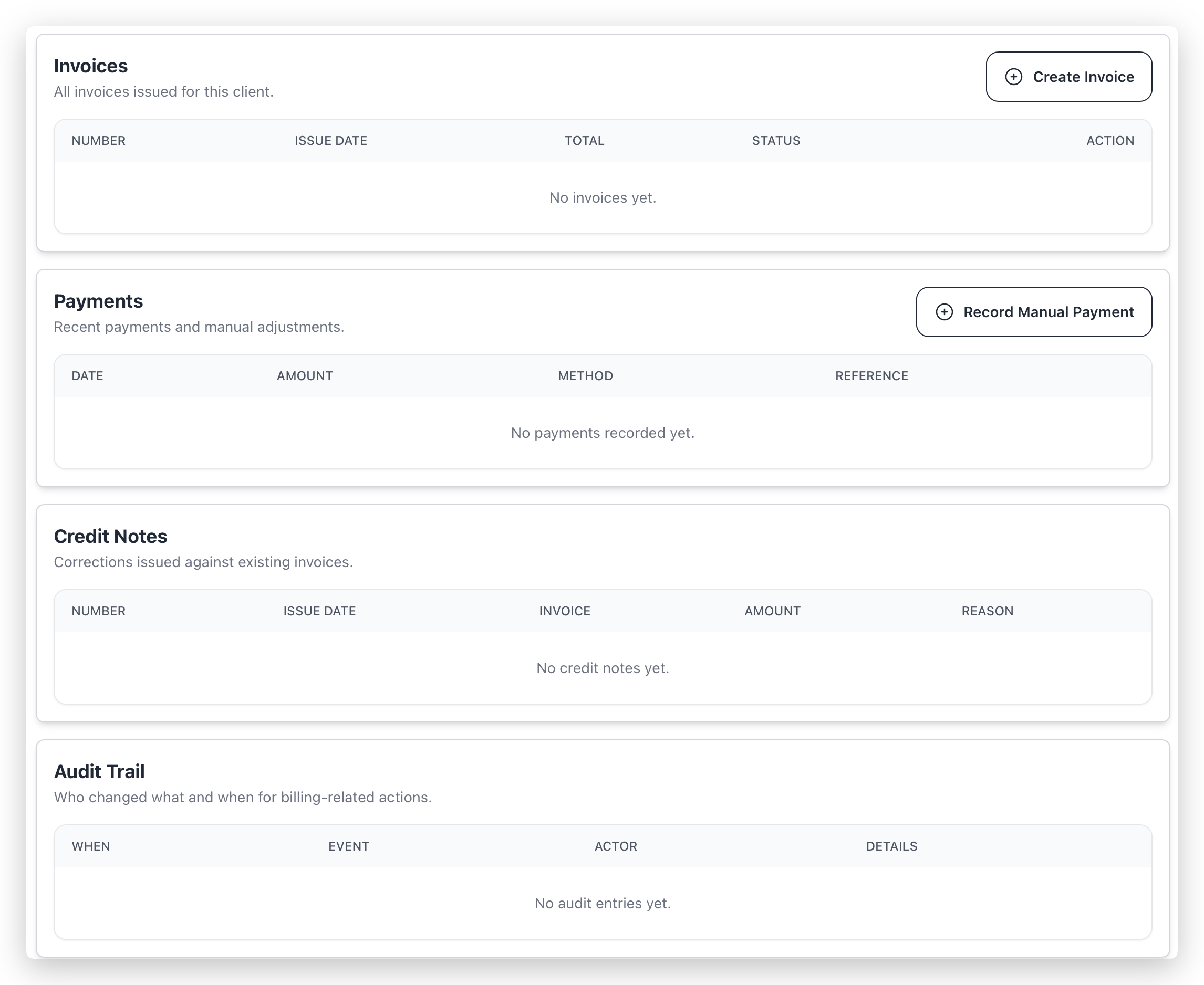
4) Invoices
List of all client invoices with status and actions.
| Action | Description | Availability |
|---|---|---|
| View | Opens invoice PDF preview | Always |
| Create Invoice | Runs invoice generation for this client only | Always |
| Send | Sends invoice email manually | Client has email, invoice is not void |
| Issue Credit Note | Creates credit note against invoice balance | Invoice not void and balance > 0 |
| Void | Voids invoice | Unpaid and no allocations |
| Void & Reissue | Voids current invoice and creates replacement | Same restrictions as Void |
Create Invoice behavior
- Uses selected Issue Date.
- Runs generation only for this client.
- Can produce multiple invoices if multiple billable items are due.
- In this flow, invoices are generated for review (manual send can be done afterward).
5) Payments
Recent payment history and manual adjustments.
| Action | Description |
|---|---|
| Record Manual Payment | Creates payment entry, allocates funds, updates balances and statuses |
Manual payment fields
| Field | Description |
|---|---|
| Amount | Required, minimum 0.01 |
| Currency | Read-only billing currency |
| Apply to Invoice | Optional target invoice |
| Reference | Optional transaction/reference ID |
| Notes | Optional internal note |
Allocation logic
- If an invoice is selected, allocation starts there.
- Remaining amount is allocated to other open invoices by oldest order.
- Invoice statuses are updated (paid / partial).
- Ledger entry payment.manual is created.
- Audit event is recorded.
- Payment-received notification flow is triggered (if mail setup allows it).
6) Credit Notes
Corrections issued against existing invoices.
| Rule | Value |
|---|---|
| Invoice must be void? | No (void invoices are blocked) |
| Outstanding balance required? | Yes |
| Amount constraints | > 0 and <= invoice balance |
Effect:
- Reduces invoice balance.
- Can move invoice to partial or paid.
- Creates ledger and audit records.
7) Audit Trail
Shows billing-related audit history for this client:
- event timestamp,
- normalized event name,
- actor (user/system),
- details (status changes, amount, related invoice/credit note metadata).
Operational Notes
| Topic | Detail |
|---|---|
| Client scope | All actions in this tab affect only the opened client |
| Email dependency | Manual invoice send and billing notifications require valid mailbox configuration |
| List windows | Payments and credit notes show recent entries; audit trail is limited to latest records for readability |
| Data integrity | Financial actions use transactions and update invoices, allocations, ledger, and audit consistently |